Launch a static site with mail in one command
Building your first site can be a challenge. This guide is opinionated: it uses the services I use every day, chosen for ease, cost, reliability, everything really. Porkbun is a solid registrar: not a lot of features, and a darn good price. For hosting, AWS CloudFront in front of an S3 bucket is a great fit when you're hosting an information site. — athinktank
You've registered a domain. Before anyone can visit it, you still need hosting, DNS, an HTTPS certificate, a way to deploy, and an email address on the domain. Setting that up by hand means an afternoon in five dashboards. The Site Launch Kit does it with one command, and it's free in Skunk Yard's open-source repository.
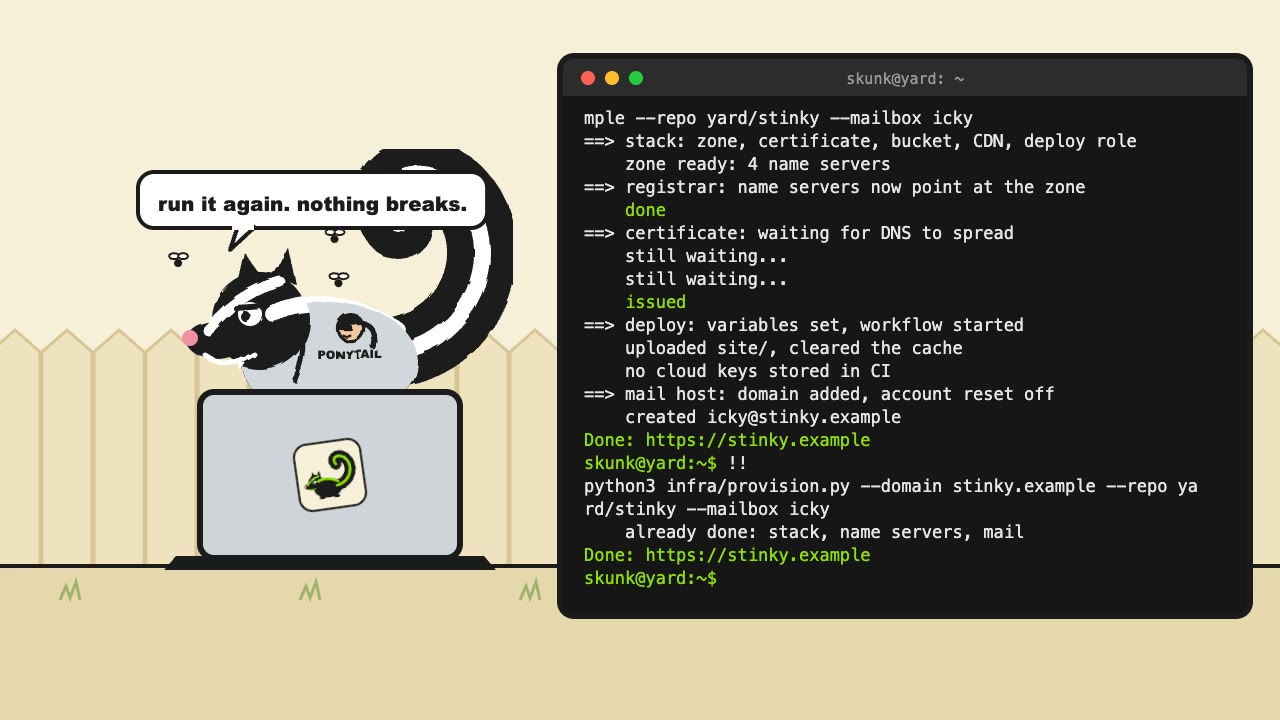
Watch it on YouTube (30 seconds, with sound).
What one command does
python3 infra/provision.py --profile <aws-profile> --domain example.com --repo you/site --mailbox helloIt drives each service through its API, in this order:
- Hosting, on AWS. It creates a CloudFormation stack: a Route 53 zone, an HTTPS certificate, a private S3 bucket, CloudFront with a www-to-apex redirect, clean URLs, a real 404 page, and security headers, the mail DNS records, a Search Console record if you pass one, and a deploy role.
- Name servers, at Porkbun. As soon as the zone exists, it points the domain's name servers at it. First it clears Porkbun's parking and mail-forwarding defaults and adds the real mail records there, because some resolvers keep using the old name servers for up to two days.
- The certificate. It waits while the new name servers spread, usually 5 to 30 minutes; the certificate validates once they do.
- Deploys, on GitHub. It sets the repository variables the deploy workflow reads, then starts the first deploy.
- Mail, at Purelymail. It adds the domain, turns off account reset for it, and creates each mailbox. You type its first password, or press Enter to get a generated one, shown once. The script keeps no copy, and it creates mailboxes only when it runs in a terminal, so a password never lands in a log.
Run it again, and nothing breaks
Before each step, the script checks what's already there and skips what's done. If a step fails, for example because the name servers haven't spread yet, fix the cause and run the same command again. It picks up where it stopped. A change to the template goes out the same way: rerun, and the stack updates only if something changed. Leave out any flag you don't want to change; the stack keeps its earlier value.
Settings for your site
- Content Security Policy. The default allows only the site's own files.
If the site loads anything from another host, such as web fonts, pass
--cspwith your policy. - Search Console. Pass
--google-site-verificationwith the TXT value Search Console gives you, and the stack adds it to the domain. Each owner verifies with their own value; repeat the flag for a second owner, up to two. Turning mail on later takes one extra step, which the README explains. - A 404 page. CloudFront serves
/404.htmlfor missing pages, so the site needs one. - Clean URLs.
/aboutserves/about/index.htmlwithout a redirect, so link to folders with a trailing slash or use root-relative links. A file with no extension returns 404.
No cloud keys in your repository
GitHub Actions never holds AWS keys. It signs in through GitHub's OIDC provider and
assumes a role that AWS trusts only for the main branch of your repository.
That role can write to the site's bucket and clear the site's cache, and nothing else. It
can't change the stack itself, so a compromised workflow can't give itself more access. The
script reads your repository's OIDC subject from GitHub, so it also works for repositories
on GitHub's newer immutable subject format.
Why mail account reset is off
Purelymail can let anyone who controls a domain's DNS reset the account's admin password. The kit puts the domain's DNS in your Route 53 zone, so that reset would be a second key to your mail. The script turns it off for the domain.
What you need
- macOS, Linux, or Windows, with the AWS command-line tool and the GitHub command-line
tool (
gh) signed in. - Your Porkbun and Purelymail API keys, supplied your way: from your secrets manager as environment variables, or typed at a hidden prompt. The script stores none of them.
- AWS credentials that can create IAM roles and CloudFormation stacks.
- A domain at Porkbun, with API access turned on for it, and a Purelymail account. No
mail? On a new site, add
--skip-mail, and the stack leaves out the mail records. On an existing stack it changes nothing.
The script is Python 3.9 or later, standard library only, so there are no Python packages to install.
Hand it to your LLM
The kit's README has a section written for an LLM: what to ask you, which files to copy into your repository, and which commands you run yourself. Point your coding assistant at it and answer its questions.
Read your mail on a phone
Add the mailbox as an IMAP account: imap.purelymail.com on port 993 and
smtp.purelymail.com on port 465, both with SSL, and the full email address as
the user name. Fill in the outgoing user name and password too; the phone may call them
optional, but without them the phone receives mail and can't send it. After saving the outgoing
settings, stay on the screen until Verifying finishes, which can take several
minutes; leaving early can leave mail stuck in the Outbox. The README has every step.
What it costs
The hosting costs the same as skunkyard.com's: $0.50 a month for the Route 53 zone, plus cents for storage, while CloudFront's always-free tier covers a small site's traffic. The prices are in An LLM built you a website. Now what? Add your registrar's yearly fee and Purelymail's, $10 a year for unlimited domains.
How it differs from skunkyard.com's setup
skunkyard.com runs on Pulumi, with its state in an S3 bucket; the guide above walks through it. The Site Launch Kit uses CloudFormation only: no Pulumi, no state bucket, and one script that also handles the registrar, GitHub, and mail. If you want the most direct path from a new domain to a live site, start with the Site Launch Kit.